How to Enrich CRM Data for Better Prospecting and Qualified Meetings
More data in your CRM doesn’t automatically mean better prospecting. If company details are outdated, contact roles are unclear or added fields don’t help identify buying fit, your sales team still has to research prospects before reaching out. Knowing how to enrich CRM data for better prospecting starts with a specific question: what information will help you decide who to contact and what to say?
For UK technology, SaaS and IT services businesses, that means focusing on relevant company and contact context, not filling every blank. You may already know that better-targeted prospecting depends on accurate records. The challenge is creating a repeatable process that keeps useful information current and makes it available to the people using it.
This guide explains which CRM fields can support prospecting, how to review and update records, and how to use campaign feedback to improve your understanding of an account. You’ll also see how to set clear data ownership rules, avoid common enrichment mistakes and connect new information to your ideal customer profile, prioritisation and sales conversations.
- Start with the prospecting decision each CRM record needs to support, then choose the company and contact fields that help your team make it.
- Keep enrichment distinct from data cleansing: add useful context, and separately correct or remove information that is unreliable.
- When considering how to enrich CRM data for better prospecting, prioritise relevant sources and track where information came from and when it was reviewed.
- Use prospect conversations to test assumptions, capture missing context and improve future outreach.
- Assess enrichment by whether priority records are useful for prospecting, not by how many fields are filled in.
What does CRM data enrichment mean for B2B prospecting?
Customer relationship management (CRM) systems bring customer and prospect information together. Enrichment makes that information more useful for a specific prospecting decision by adding relevant, checked context to existing company and contact records.
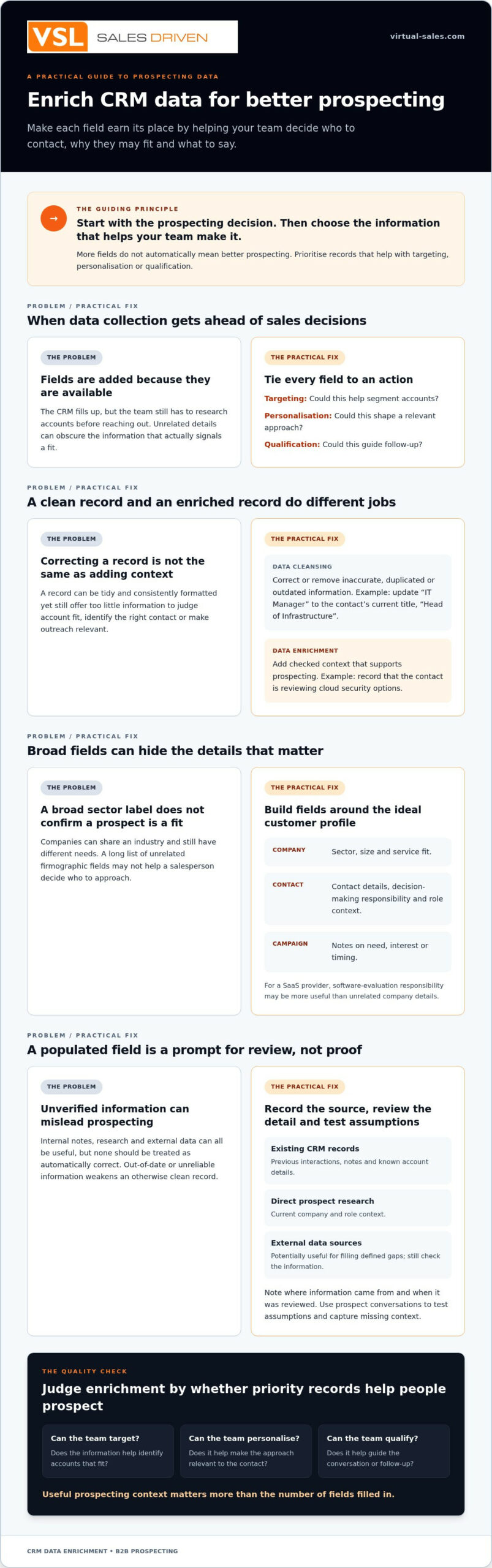
CRM data enrichment adds relevant context to existing records; data cleansing corrects or removes information that is inaccurate, duplicated or no longer useful. Both matter, but they solve different problems. A record can be clean and consistently formatted yet still tell a sales team too little about whether an account fits, who to approach or what might make a conversation relevant.
The commercial purpose is practical: help your team decide whom to contact, why they might be a fit and what context to use when reaching out. For a technology business, that could mean distinguishing companies that need a particular IT service from those that merely operate in the same broad sector.
Which CRM fields help B2B prospecting?
Choose fields based on your ideal customer profile and the decisions your sales team needs to make, rather than collecting details simply because they’re available. Useful categories include company information, such as sector and size; contact details; role information, such as decision-making responsibility; and campaign notes on need, interest or timing. For a SaaS provider, service fit and the contact’s responsibility for evaluating software may be more useful than a long list of unrelated firmographic fields.
To keep enrichment focused, Virtual Sales Limited’s guidance on prioritising sales opportunities over data volume can help frame the decision: capture what supports targeting and a more relevant conversation.
How enrichment differs from data cleansing
Suppose a contact’s title is recorded as “IT Manager”, but their current title is “Head of Infrastructure”. Correcting the title is cleansing. Adding a checked note that they’re reviewing cloud security options is enrichment, because it provides buying context for a relevant conversation.
A clean record can still lack that context. Conversely, adding more information won’t help if it’s out of date or unreliable. Treat the two processes as complementary: cleanse the record, then add information that supports targeting, prioritisation or outreach. That distinction is a useful starting point for how to enrich CRM data for better prospecting without turning your CRM into a storehouse of unused fields.
How to Prioritise CRM Data Enrichment
Don’t begin with a list of fields your CRM can hold. Begin with the decision your sales team needs to make. Is this company a fit for your ideal customer profile? Which role should you approach? What information would make the first conversation relevant? The answers determine which gaps are worth filling.
Choose CRM fields by how they help your ideal customer profile guide sales action, and enrichment stays focused on prospecting rather than data collection.
Build a field plan around your ideal customer profile
Turn your ICP into practical company and contact criteria. A technology firm might prioritise sector, service fit and the type of organisation it supports. For contacts, define the decision-maker roles that matter, such as a technology leader responsible for infrastructure, and the role context that helps a salesperson understand their remit.
Give each proposed field a clear purpose. For example:
- Targeting: sector or service fit to help segment accounts.
- Personalisation: a contact’s area of responsibility to shape relevant outreach.
- Qualification: a recorded business need or timing detail to guide follow-up.
Also distinguish what the team knows from what it has sourced and what still needs confirmation. A documented source or review note helps colleagues judge whether a detail is established or should be tested in conversation. VSL’s guidance on prioritising sales opportunities over data volume can help keep field selection tied to useful sales decisions.
Set priorities using prospecting gaps
Look at where missing information creates friction now. Perhaps sales staff can’t segment accounts by service fit, spend time finding the right decision-maker, or lack context for a useful follow-up. Rank gaps by whether resolving them would change who you contact or how you approach them. If a field won’t affect targeting, personalisation or qualification, it may not deserve priority.
This is the practical route to how to enrich CRM data for better prospecting: connect each field to an action, then review whether it helps the team take that action. A clear ICP is the starting point, as explored in VSL’s article on why a weak ideal customer profile limits prospecting. If you’re considering support with technology prospecting, you can also view VSL’s appointment-setting profile and client feedback.
How to source and validate enriched CRM information
Choose a source according to the field you need and how you’ll use it. Internal records may explain previous contact or account history; direct prospect research can add current company and role context; external data sources may help fill defined gaps. None should be treated as automatically correct. A populated CRM field is a prompt for review, not proof.
Compare enrichment methods by use case
Existing CRM records
Context gained: Previous interactions, notes and known account details.
Verification effort: Check when the information was entered and whether later activity supports it.
Best fit: Building on your team’s existing knowledge of an account.
Prospect research
Context gained: Information about a company, its services or a contact’s current role.
Verification effort: Check that the source is credible and the detail is current.
Best fit: Validating priority accounts or researching information that shapes an approach.
External data sources
Context gained: Details that may help fill specific company or contact gaps.
Verification effort: Review the source, date and suitability of each field for your purpose.
Best fit: Supporting defined enrichment needs where the information can be checked.
The right choice depends on the field, intended use and evidence available. A company’s sector may be easier to verify from its own published information, while a contact’s decision-making responsibility may need to be checked through professional research or confirmed in conversation. Avoid treating every source as equally useful across every field.
Create a practical verification routine
Before outreach, check company and role details against credible, current information. Flag conflicting or incomplete entries for review. Mark time-sensitive details, such as a job title or a stated project requirement, so the team knows they may need confirming rather than repeating as fact.
Where your CRM process allows, retain the source and review date alongside the field. Assign ownership for key updates too. For example, decide whether marketing maintains company segmentation fields and whether sales updates role and qualification notes after a conversation. Clear ownership reduces the chance that conflicting edits go unexamined.
Personal data needs particular care. Before using third-party contact information for prospecting, consider whether the processing and planned outreach meet applicable UK GDPR requirements, including having an appropriate lawful basis, providing required transparency and respecting people’s rights. Collect only information relevant to your stated purpose, and refer to current Information Commissioner’s Office guidance where needed. Enrichment can inform prospecting, but it doesn’t by itself establish compliance or guarantee accuracy.
In practice, human review closes the gap between a source and a usable record. Consultative conversations can confirm or correct assumptions, with campaign outcomes and notes then reviewed before they inform future outreach. That makes the process of how to enrich CRM data for better prospecting a continuing cycle of sourcing, checking and learning, rather than a one-off data upload.
How to turn enriched CRM records into better prospecting
Enriched records create value when they change how your team selects and approaches prospects. Treat enrichment as part of a working campaign cycle: define the ideal customer profile (ICP), prioritise accounts, add relevant context, verify it, engage prospects and review what you learn. Each stage should inform the next.
A practical enrichment-to-outreach workflow
- Define fit: Set the company criteria and decision-maker roles that matter for the campaign.
- Prioritise records: Focus on accounts where better information could change targeting or follow-up.
- Source and check context: Add relevant company or role information, then verify it before using it in outreach.
- Engage consultatively: Use the context to open a relevant business conversation, not to assume you already know the prospect’s needs.
- Review and update: Record confirmed responses and campaign outcomes so the team can assess and refine the account information.
Illustrative scenario, not a VSL client result: A software provider is targeting firms that may need to strengthen their data security. The CRM shows that an account is in the right sector, but the decision-maker’s responsibility is unclear. Research suggests a particular contact may oversee IT operations, so the caller uses that as a starting point, not an established fact. In a consultative conversation, the contact clarifies their remit and explains that a security review is planned for a later date. The team can then update the record with the confirmed role and relevant timing, and plan follow-up accordingly.
That human feedback matters. Prospect conversations can expose outdated titles, reveal a different decision-maker or show that a recorded assumption about need was wrong. Capture what was actually confirmed, distinguish it from interpretation, and use the distinction to guide future outreach.
What VSL campaign feedback can contribute
VSL campaign managers handle data sourcing, results analysis and recommendations. Campaign outcomes are tracked in VSL’s cloud-based CRM, and weekly reports include call metrics and outcomes. The documented outcome labels are Call Back, Warmer Contact, Warm Lead, Future Opp, Not Interested and Happy to Keep in Touch. These give the team a structured view of what happened, while conversation notes can add context for review.
VSL works as an extension of your sales and marketing team, using consultative, script-free conversations with relevant business decision-makers. Campaign data can be output for use with popular CRM platforms such as HubSpot and Salesforce; this does not imply a direct integration. Explore technology lead generation for B2B companies to see how campaign activity can support prospecting.
BOOK A 15-MINUTE DISCOVERY CALL →
Assessing Enrichment Quality and Improvements
A CRM can contain many populated fields and still leave sales teams unsure who to approach or how to make the conversation relevant. Assess enrichment by how well priority records support the campaign’s objectives, not by the volume of information stored.
Choose measures that reflect prospecting usefulness
Agree what a usable record needs to contain before reviewing campaign performance. Depending on your ideal customer profile and sales process, assess whether priority records include:
- Relevant company details, such as sector and service fit.
- Contact information and a role that matches the decision-maker criteria.
- Campaign context that helps guide targeting, personalisation or qualification.
- Visible source and review details, where your CRM process allows.
Then compare prospect conversations with the stored information. Track whether contacts confirm a detail, correct an assumption or add useful context. If a role is often different from the one recorded, review how that field is sourced and checked. If conversations repeatedly reveal the same missing qualification detail, consider whether it belongs in your campaign record.
Review those observations alongside campaign outcomes and your team’s stated objectives. There’s no universal benchmark that proves enrichment is working. A useful assessment asks whether the information supports better targeting and follow-up for this campaign, and whether the team can distinguish confirmed facts from details still needing validation.
When a structured enrichment process is useful
A defined process can help when you’re entering a new technology market, targeting a new ICP or revisiting a database that isn’t supporting consistent prospecting. It’s also useful when sales staff spend too much time finding basic account context or when unclear ownership means CRM updates are missed.
External campaign support may suit teams that need dedicated prospecting activity and a regular feedback loop. VSL campaign managers handle data sourcing, campaign management, results analysis and recommendations. Weekly reporting covers call metrics and outcomes, while leads are qualified to BANT criteria as a minimum. VSL campaign data can be output for use with popular CRM platforms such as HubSpot and Salesforce. This does not imply a direct integration.
Use campaign reviews to decide what to retain, recheck or change in your enrichment process. Keep the measures tied to the campaign objective, and treat prospect feedback as evidence to assess, not as an automatic reason to overwrite a record.
If you’re reviewing prospect data alongside a technology outreach campaign, explore VSL’s technology lead generation service as a potential extension of your sales and marketing team.
Make CRM enrichment part of your prospecting process
Effective enrichment isn’t about filling every blank. It’s about adding relevant, checked context to the records your team needs, then reviewing what happens when that information guides outreach. Start with your ideal customer profile, prioritise the fields that affect targeting or qualification, and use prospect feedback to correct assumptions and improve future records.
That’s the practical approach to how to enrich CRM data for better prospecting: connect each field to a sales decision, keep track of what’s known and what needs confirmation, and assess usefulness against your campaign objectives. VSL, founded in March 2001, supports technology companies with campaign management and consultative, script-free conversations. Campaign managers have over 20 years’ telemarketing experience, and leads are qualified to BANT criteria as a minimum. Weekly reporting covers campaign metrics and tracked prospect outcomes.
If a more structured approach to prospecting and campaign feedback would support your team, VSL can work as an extension of your sales and marketing function.
Keep the process focused, learn from each conversation and give your team CRM records they can put to practical use.
Frequently Asked Questions
How do you enrich CRM data for better prospecting?
If you’re working out how to enrich CRM data for better prospecting, begin with the decision each record should support. Define your ideal customer profile and relevant decision-maker roles, then identify missing company, contact or campaign details that could affect targeting or outreach. Choose suitable sources, check information before use, record its source and review date where possible, and update records with confirmed prospect feedback.
What information should you add to a B2B CRM record?
Add information that helps your team assess fit, identify the right contact or make outreach relevant. This may include a company’s sector and service fit, a contact’s current job title and area of responsibility, and campaign context such as a stated need or timing. Choose fields that support a clear sales action. Avoid collecting personal or company details that your team won’t use for the stated prospecting purpose.
How often should CRM data be reviewed and enriched?
Set review timing according to how quickly each field can change and how often your team relies on it. A contact’s role may need checking before a new campaign or after a prospect conversation, while some company details may remain useful for longer. Review priority records before outreach, and update them when credible new information or prospect feedback indicates a change. Keep the process ongoing rather than relying only on occasional clean-ups.
What is the difference between CRM data enrichment and data cleansing?
Enrichment adds relevant context to an existing company or contact record. Data cleansing corrects, standardises or removes information that is inaccurate, duplicated or no longer useful. For example, changing an outdated job title is cleansing; adding verified context about a contact’s responsibility for a technology project is enrichment. A record can be tidy and consistent yet still lack the information a salesperson needs to make outreach relevant.
Can enriched CRM data improve prospect qualification?
Relevant, checked information can help your team assess whether an account fits the ideal customer profile and identify questions to explore with a prospect. It can support qualification, but it doesn’t establish need, authority, budget or timing on its own. Confirm those points through an appropriate business conversation. VSL qualifies leads to BANT criteria as a minimum, using consultative conversations to understand the prospect’s requirements.
Is CRM data enrichment GDPR-compliant?
Enrichment isn’t automatically GDPR-compliant or non-compliant. It depends on what personal data you collect, where it comes from, your purpose and lawful basis, and how you use and maintain it. Limit information to what’s relevant, keep source details where possible, provide appropriate transparency and respect individuals’ rights. Check current guidance from the UK Information Commissioner’s Office (ICO) and seek specialist advice if you’re unsure how requirements apply to your processing.
Can campaign data be used with HubSpot or Salesforce?
Yes. VSL uses a cloud-based CRM to manage campaign activity and can output campaign data for use with popular CRM platforms such as HubSpot and Salesforce. This describes data output for use in those platforms, not a direct integration. Agree which campaign fields and outcomes your team needs, then decide how to review and add that information to your CRM records.

Disclaimer
Disclaimer: Content is for general information only and does not constitute professional advice. Results may vary. Virtual Sales Limited accepts no liability for actions taken based on this content.
Tags: Appointment Setting, B2B Lead Generation, B2B Prospecting, CRM data enrichment, data hygiene, Sales Pipeline, technology sales