How SaaS Sales Teams Can Follow Up After a Webinar to Book Meetings
A webinar’s value is decided by what happens after the session. How SaaS sales teams can follow up after a webinar to book meetings comes down to timely, relevant contact: prioritise attendees who showed buying interest, give no-shows a useful route to the recording, and make the next step easy to accept.
It’s tempting to send everyone the same recap and wait for replies. But that can miss the context behind each person’s attendance, questions and engagement. A stronger follow-up connects the webinar topic to a prospect’s likely needs and gives them a clear reason to continue the conversation.
This article explains how to prioritise follow-up, tailor messages for attendees and no-shows, and coordinate email, LinkedIn and WhatsApp without overwhelming prospects. It also shows how a relevant resource and a direct meeting invitation can turn interest into a considered next step.
Key Takeaways
- Separate registrants who attended from those who missed the session, then tailor the message to each person’s participation and interests.
- Give email, LinkedIn and WhatsApp distinct roles in your follow-up so each touchpoint adds context rather than repeating the same pitch.
- Choose a useful follow-up asset and make the next step easy, with a meeting invitation that connects directly to the prospect’s priorities.
- Prioritise timely, personal contact for high-intent prospects, then use a considered sequence to keep the conversation moving.
Can I reach people who registered but didn’t attend?
Yes. Treat non-attendance as a reason to adapt your follow-up, not as evidence of disinterest. Segment registrants by attendance, session activity and fit with your ideal customer profile (ICP).
Segment registrants by attendance
Separate attendees from registrants who missed the live session, then consider their participation alongside ICP fit, role and company relevance. Record questions, downloads and other interactions as context, not proof of buying intent. Someone who attended a technical session, for example, may need a different follow-up from someone interested in commercial strategy. Use these distinctions to choose an appropriate resource or conversation.
Contact non-attendees after the webinar
Send a concise message acknowledging the missed session and offering its recording or a relevant resource. The Information Commissioner’s Office (ICO) explains that UK GDPR requires a lawful basis and transparency when processing personal data; PECR rules also apply to electronic marketing. The ICO explains that PECR requirements differ by recipient type, so account for that distinction and respect objections and opt-outs.
- Build a tailored sequence. Give attendees a recap or resource tied to their session; offer non-attendees the recording and a brief summary. Follow with a relevant insight, then invite suitable, engaged prospects to discuss their priorities. Make each message add context. Keep automated messages useful rather than repetitive.
- Approve the audience and copy. Have marketing and sales review the segmented list, session details, replay links and wording before sending. Apply contact preferences and exclusions, and ensure each template reflects the recipient’s recorded activity.
- Measure the path to meetings. Track delivered messages, replies, booked meetings and opportunities by registrant segment. Compare attendee and non-attendee outcomes, then connect resulting opportunities to pipeline and revenue using your team’s agreed attribution method. Use the findings to refine session topics and follow-up messages.
Coordinating follow-up across LinkedIn, email and WhatsApp
- Choose follow-up channels that are appropriate for the prospect, the business relationship and applicable marketing rules. Email and LinkedIn may help distribute relevant webinar resources, while a consultative telephone conversation can explore a prospect’s requirements and establish whether a meaningful sales opportunity exists. Do not assume that registering for a webinar provides permission for marketing through every channel.
Use the CRM to connect webinar source data with the contact’s existing account record. Keep channel, campaign and session details consistent so sales can distinguish event engagement from other activity. Assign an owner when a prospect replies or requests a discussion. This prevents conflicting messages from different colleagues and gives the next conversation useful context. Don’t treat a click or connection request alone as a signal that someone is ready to book.
2. ### Prioritise leads with CRM and webinar metrics
-
Time behaviour-based email follow-up
Let a prospect’s actions shape the next email instead of sending everyone the same nurture message. A recording view can prompt a note about a relevant section; a reply calls for a direct answer. For webinar promotion, space reminders around the event and make each one useful, perhaps by highlighting a speaker or practical topic. Stop promotional messages when someone registers, and respect their communication preferences.
-
Personalise follow-up emails
Anchor each message in a detail the recipient will recognise, such as their question or the session topic. A finance leader who asked about reporting needs different context from a product manager interested in implementation. Keep the subject line specific, explain why you’re contacting them, and make one relevant request. For teams aligning event outreach with broader software lead generation, keep the same account context across channels.
Follow-up assets and low-friction calls to action
A useful asset gives a prospect something concrete to apply after the webinar. Match the resource and invitation to the questions raised instead of sending the same material to every contact.
-
Prepare follow-up assets
Choose resources that extend the session, such as an implementation checklist, product comparison or customer example. For someone who missed the event, pair the recording with a short summary of its most relevant discussion. For an attendee, point to a specific insight connected to their question or role.Keep each asset focused on one decision or problem. A template can help a prospect assess their current process; a technical guide may suit someone exploring implementation. Check that the link works and the material is appropriate for the recipient. If delivery is automated, use attendance or interaction data to select the right resource. Avoid sending a large pack that leaves the prospect unsure where to start.
-
Choose a single low-friction call to action
Choose one next step for each message, such as discussing how the webinar’s strategy applies to the prospect’s team. Explain what the conversation would cover and how it follows from the session. Avoid combining requests to book a meeting, download another guide and register for another event. A clear invitation is easier to consider and answer.Design the webinar to support that same next step. Give the audience a clear introduction, useful main content and time to ask questions. Reserve a brief moment at the close to explain what happens next, linking it directly to the subject discussed. Keep booking straightforward and give the meeting a practical purpose. Prospects who prefer to research independently can receive a relevant resource first, then decide whether a conversation would help.
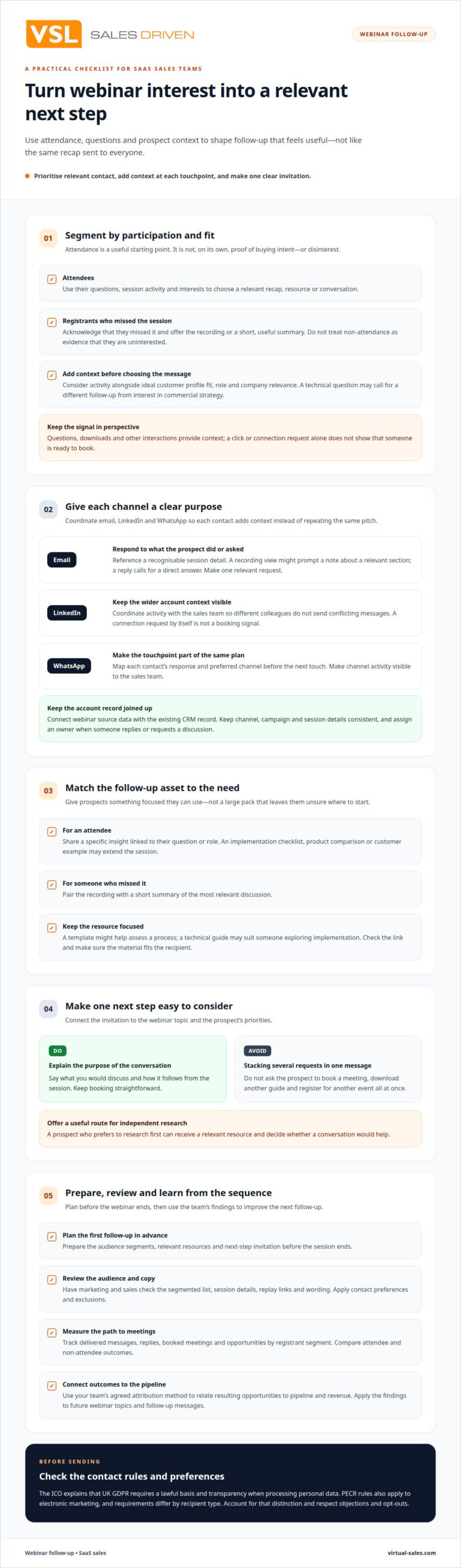
Follow-up timing after a webinar
Plan the first follow-up before the webinar ends. Use each prospect’s questions, attendance and behaviour to determine the next step.
-
Prioritise prompt, relevant follow-up while the webinar remains fresh. Prospects who have requested a demonstration, asked a specific buying question or expressed genuine interest should receive timely personal attention. Other attendees may benefit from a tailored recap or useful resource before being invited to a conversation.
Plan a proportionate follow-up sequence based on the prospect’s role, interests, engagement and communication preferences. Combine relevant channels where appropriate, ensuring every contact adds value. Adjust or stop follow-up when someone responds, books a meeting, objects to further contact or indicates that the timing is unsuitable.
- Use the first message to recap the session’s key takeaways and answer a question the prospect raised. A call can then explore how that issue affects their team, rather than repeating the email. If there’s no response, send a useful resource before making another meeting request. A final check-in between 48 and 72 hours after the webinar can prompt a clear next step.
- Review engagement at 48 hours and adjust the remaining sequence. A replay view or download can guide the next message, but neither alone proves buying intent. If a prospect asks a specific question, answer it directly; if demand is unclear, offer a relevant conversation without implying urgency. Record replies, meetings and opportunities so the team can assess which timing supports pipeline progression.
Virtual Sales Limited
Virtual Sales Limited (VSL) helps SaaS and software businesses turn webinar engagement into meaningful sales conversations through experienced UK-based callers.
Working alongside your sales and marketing teams, VSL can research relevant prospects, conduct consultative telephone follow-up, explore business requirements and qualify potential opportunities against agreed criteria, including BANT.
Our callers take time to understand your software proposition, target audience and the questions raised by prospects. Each campaign is supported by dedicated campaign management and weekly reporting.
With flexible monthly subscriptions, no setup fees and the ability to cancel after the first month, VSL provides additional prospecting capacity without requiring you to recruit an in-house SDR team.
If you’re planning a webinar programme or looking to improve follow-up with relevant decision-makers, book a 15-minute discovery call to discuss how VSL could support your campaign.
It’s a practical next step when your team needs support engaging relevant business decision-makers beyond the webinar itself. Explore our SaaS appointment-setting services to see how VSL can support your webinar follow-up campaigns.
It’s a practical next step when your team needs support engaging relevant business decision-makers beyond the webinar itself. Contact Virtual Sales Limited to discuss how webinar follow-up could fit your sales process.
Turn your next webinar into a stronger sales motion
Use each webinar as a learning loop for sales and marketing. Review which questions led to useful conversations, where follow-up stalled and which audience segments progressed. Then refine the session, messaging and handover in response. These insights give your team a clearer starting point for deciding how SaaS sales teams can follow up after a webinar to book meetings, without assuming every registration signals equal interest.
Build on what each event reveals, and give promising conversations room to progress.
Frequently Asked Questions
How fast should sales follow up after a webinar?
Follow up promptly, while the session is fresh. Send a relevant email soon after the event, and prioritise attendees who requested a meeting or raised a buying question. Before the webinar closes, assign these high-intent contacts to an owner. That way, a clear question or meeting request won’t wait behind routine post-event administration.
How to follow up with no-shows without sounding generic?
Refer to the specific session they registered for, then offer a useful way to catch up. For example: “You registered for our session on SaaS onboarding. Here’s the recording, plus the section on reducing handover friction.” Don’t assume why they missed it or suggest they owe you a reply. A relevant resource gives them a reason to engage on their terms.
How soon should you send webinar follow-up emails?
Send the first email promptly after the webinar, with a useful subject line and one clear purpose. For instance, a message to someone who asked about implementation could include the relevant answer or resource. If the attendee needs a detailed response, acknowledge the question first and follow up thoughtfully, rather than sending an automated message that overlooks it.
How do you politely follow up with attendees who haven’t responded?
Make the next message useful and easy to answer. You might write, “Was the section on product adoption relevant to your current plans, or should I send a different resource?” This invites a simple response without pressure. If there’s still no reply, stop the active sequence and follow the recipient’s contact preferences. Don’t switch channels just to repeat the same request.
What is event follow-up?
Event follow-up is the planned communication after a webinar, conference or other business event. It connects someone’s participation with a relevant next action, such as receiving a recording, getting an answer or discussing a business requirement. A useful process captures the event source and conversation context, allowing sales to continue naturally instead of treating every new contact as an unrelated lead.
How soon should sales teams follow up with webinar attendees?
Send attendees a useful follow-up promptly after the session, with a recording or resource suited to their interests. If someone asks a direct question or requests a meeting, respond as soon as practical rather than waiting for the general nurture sequence. For other attendees, use their session activity to shape the next contact instead of sending repeated reminders without offering new value.

Disclaimer
Disclaimer: Content is for general information only and does not constitute professional advice. Results may vary. Virtual Sales Limited accepts no liability for actions taken based on this content.
Tags: attendee engagement, B2B Sales, Lead Nurturing, SaaS Sales, sales meetings, sales outreach, webinar follow-up